Bee Queen Digital Scrapbook Kit: A Practical Guide for Crafters and Designers
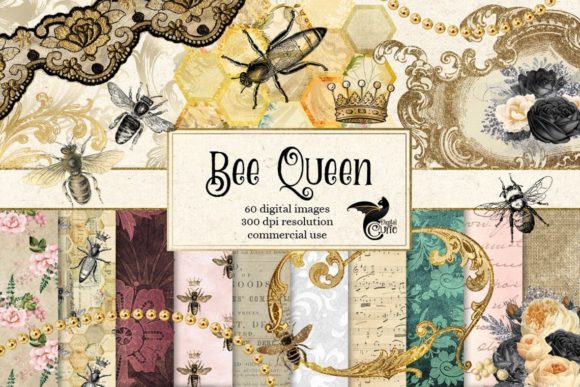
The Bee Queen Digital Scrapbook Kit offers a charming collection of vintage aesthetics tailored specifically for card making, scrapbooking, and invitations. As an instant download, this digital asset pack provides immediate access to high-resolution graphics that evoke the warmth and nostalgia of antique apiaries and botanical gardens. For creators ranging from hobbyists to professional stationery designers, understanding exactly what is included—and more importantly, how to utilize these assets correctly—is essential for achieving professional results without unnecessary frustration.
Many enthusiasts purchase digital kits based solely on the thumbnail preview, only to find themselves struggling with file management or design cohesion later. The Bee Queen Digital Scrapbook Kit contains 47 distinct graphic elements, but simply having them does not guarantee a successful project. To maximize the value of this kit, it is helpful to approach it with a clear understanding of technical specifications and common application pitfalls that often plague digital crafting projects.
Understanding Asset Specifications Before You Begin
A frequent oversight when working with vintage-style digital papers is assuming all files serve the same purpose. This kit includes 10 backgrounds in JPG format measuring 12x12 inches (30.48 cm) at 300 dpi. These dimensions are industry standard for physical scrapbooking, yet many beginners mistakenly attempt to use these raster-based JPGs as scalable vector elements. Unlike vectors, these textures will pixelate if resized significantly beyond their original dimensions. Always check your canvas size before placing these backgrounds. If you are designing for web-only purposes, you should downsample these images to 72 dpi to reduce file load times, whereas print projects demand the full 300 dpi resolution to ensure crisp honeycomb patterns and floral details.
The kit also features transparent PNG elements, including 10 antique flowers, 6 crowns, 6 honey bees and beehives, and 22 honeycomb hexagons. A common mistake here involves ignoring the transparency channel. Some users drag these PNGs into software that flattens layers automatically or saves in non-transparent formats like standard JPG, resulting in unsightly white boxes around delicate bee wings or crown filigree. Always verify that your export settings preserve alpha channels when layering these illustrations over the vintage textured backgrounds.
Evaluating Composition and Visual Balance
Vintage aesthetics can easily become visually cluttered if not managed with intention. With 22 individual honeycomb hexagons plus a grouped set, there is ample opportunity for pattern creation. However, a recurring issue in amateur designs is the lack of hierarchy. When every element competes for attention, the focal point gets lost. The antique crowns and detailed bee illustrations in this kit are intricate; they require breathing room.
Rather than filling every inch of the 12x12 canvas, consider using the honeycomb hexagons as subtle framing devices or negative space fillers rather than primary subjects. The grouped honeycomb set measures approximately 3.5 x 3.5 inches, making it perfect for corner accents or photo mats. Use the individual hexagons to create custom borders that guide the eye toward your central content, whether that is a photograph, journaling block, or invitation text. This strategic placement prevents the "busy" look that often detracts from vintage-themed projects.
Technical Considerations for Print vs. Digital Use
One of the most significant areas where crafters encounter disappointment is color management. Vintage honey tones and muted florals are particularly sensitive to color profile mismatches. The Bee Queen Digital Scrapbook Kit is designed with rich, warm palettes typical of antique ephemera. If you are printing these designs at home or through a professional lab, failing to convert your workspace from RGB to CMYK can result in dull yellows and muddy browns that fail to capture the intended vintage warmth.
Before finalizing any print project, perform a test print on your intended paper stock. Vintage textures often interact differently with matte versus glossy finishes. Matte paper tends to enhance the antique feel of the Bee Queen backgrounds, while glossy paper can make the digital textures appear artificial. Additionally, ensure your printer settings are calibrated for "high quality" or "photo" printing when using the 300 dpi assets. Draft mode printing will introduce banding in the gradient areas of the honeycomb and floral illustrations, negating the benefit of high-resolution source files.
Licensing and Commercial Application Awareness
For entrepreneurs, marketers, and small business owners considering this kit for commercial products, reading the specific license terms is non-negotiable. While the kit is excellent for creating sellable physical cards or invitations, assumptions about digital redistribution rights can lead to legal complications. Never assume that purchasing a digital kit grants unlimited commercial usage across all mediums. Verify whether the license permits use in digital templates for resale, print-on-demand services, or client work. Understanding these boundaries upfront protects your business and ensures ethical use of the artist's work.
Optimizing Workflow Efficiency
Digital hoarding is a real productivity killer. Downloading the Bee Queen Digital Scrapbook Kit and leaving it in a generic "Downloads" folder creates friction every time you sit down to create. Establish a dedicated asset library immediately upon purchase. Organize the 47 elements into subfolders labeled by type: Backgrounds, Florals, Bees, Crowns, and Honeycombs. This simple organizational step reduces search time and keeps your creative flow uninterrupted.
Furthermore, consider creating template files within your preferred design software. Since the backgrounds are fixed at 12x12 inches, set up master documents with pre-loaded color palettes sampled from the kit’s vintage textures. Having swatches ready prevents the guesswork of color matching when adding text or external elements. For the honeycomb hexagons, create smart objects or symbols if your software supports them. This allows you to resize or recolor multiple hexagons simultaneously without degrading quality, streamlining the process of building complex geometric patterns for invitation borders or card backs.
Avoiding Style Mismatches
While mixing assets from different kits is common, doing so without care can break visual immersion. The Bee Queen Digital Scrapbook Kit has a distinct antique, slightly weathered aesthetic. Pairing these elements with modern, flat-design graphics or neon colors often creates a jarring disconnect. If you must combine assets from other sources, apply consistent texture overlays or color grading to unify the disparate elements. The vintage textures included in this kit can actually serve as unifying overlays for cleaner, modern photos, helping integrate contemporary portraits into the historical theme seamlessly.
Ultimately, the success of your project depends less on the quantity of assets and more on thoughtful application. By respecting technical specifications, managing color profiles, organizing your workflow, and maintaining stylistic consistency, you transform a simple digital download into a versatile toolkit for professional-grade craftsmanship. Take the time to understand these nuances, and the Bee Queen Digital Scrapbook Kit will serve as a reliable foundation for countless creative endeavors.